Streamlining Patient Intake: Best Practices for Healthcare Practices

Patient intake is where first impressions become long-term relationships—or where friction sends patients elsewhere. When the patient intake process is slow, repetitive, or unclear, staff spend more time chasing forms and less time caring for people. The good news: with a few operational changes (and the right automation), streamlining intake can reduce no-shows, improve patient satisfaction, and increase revenue without adding headcount.
In this guide, you’ll learn best practices for healthcare practice management teams who want a faster, more accurate, more patient-friendly intake experience—whether you’re in primary care, urgent care, or behavioral health, including streamlining patient intake with AI.
Why the patient intake process matters (more than you think)
Intake is not just paperwork; it’s a clinical, financial, and brand-critical workflow.
- Clinical safety: Missing allergies, meds, or history increases risk.
- Revenue cycle health: Incomplete insurance and eligibility details lead to denials and rework.
- Patient experience: Long waits and repeated questions erode trust.
- Operational efficiency: Intake bottlenecks back up the schedule and phones.
Industry data consistently shows that access and administrative friction drive leakage. For example, surveys across healthcare consumer experience regularly find that long wait times and poor communication are top reasons patients switch providers. Streamlining intake is one of the highest-ROI fixes because it touches scheduling, phones, front desk workload, and downstream billing.
If you’re building a modern intake workflow, start with FrontDesk’s New Patient Intake use case to see the core components that can be automated.
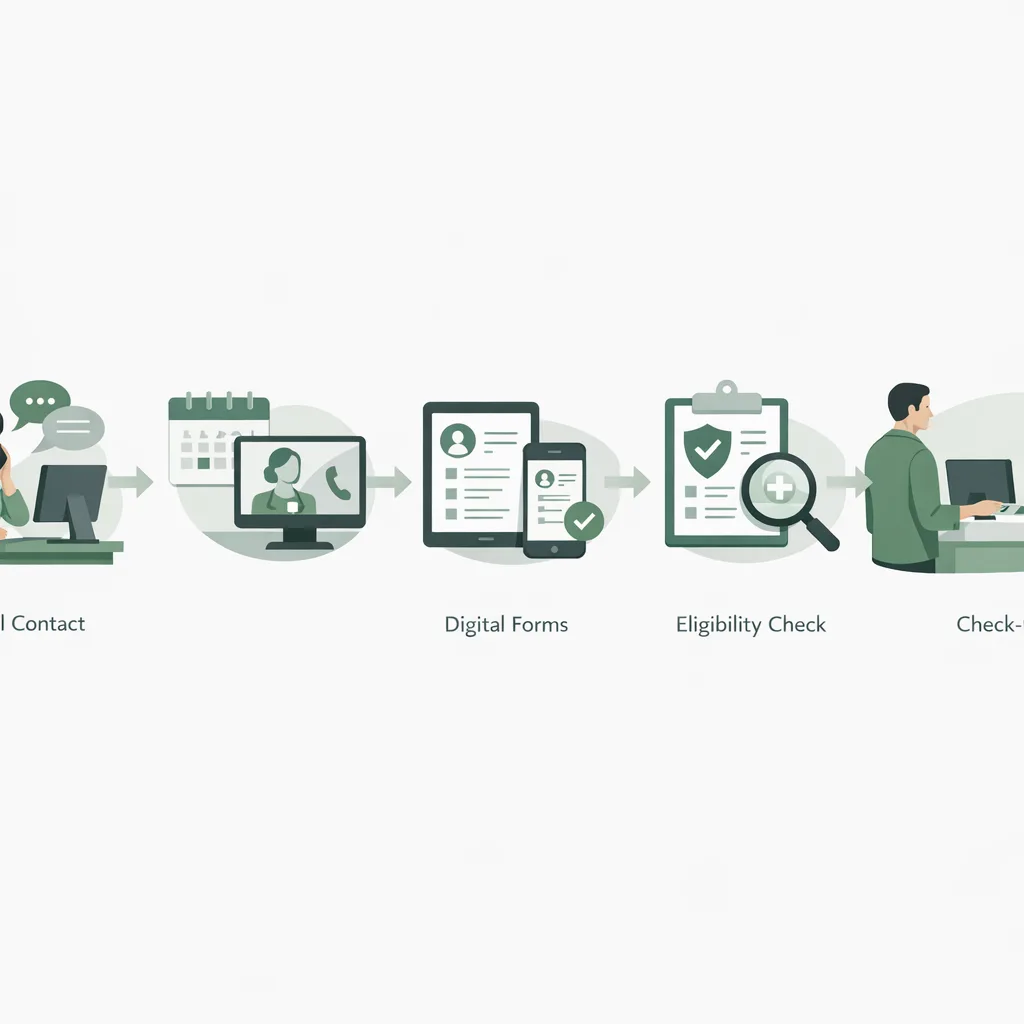
Map your intake workflow before you “fix” it
Many practices try to improve intake by adding another form, another script, or another reminder. Instead, map the current state end-to-end so you can remove steps—not just digitize them.
A simple intake map to document
Capture these stages and who owns them:
- First contact (phone, web, referral, walk-in)
- Triage / reason for visit (urgency, provider match, location)
- Scheduling (availability, appointment type)
- Pre-visit collection (demographics, consent, history, insurance)
- Verification (eligibility, copay expectations, authorizations)
- Day-of check-in (identity, forms complete, payments)
- Post-visit follow-up (next appointment, referrals, outreach)
Identify the friction points that create rework
Look for:
- Duplicate data entry (patient repeats the same info on phone, portal, and clipboard)
- “Unknowns” at check-in (insurance card missing, forms incomplete)
- Long call times for basic questions
- Patients who don’t answer calls or forget next steps
- Staff toggling between EHR, phone, and spreadsheets
To quantify where you’re losing time and revenue, pair your workflow map with baseline metrics (see the KPI section below) and add a simple weekly review.
Best practices for streamlining intake (what high-performing practices do)
The most effective intake improvements share one theme: collect the right information at the right time, in the right channel.
1) Standardize appointment types and required fields
If every provider or location requests different information, intake will always be inconsistent.
Action steps:
- Create standard appointment types (e.g., New Patient, Follow-up, Physical, Urgent Visit, Telehealth).
- Define required intake fields per type (minimum viable data).
- Add conditional questions only when needed (e.g., pregnancy status only for relevant visits).
A good rule: if a field doesn’t change clinical care, billing, or patient safety, make it optional.
2) Move data capture earlier—with digital-first forms
The fastest front desks don’t “do intake” at the counter. They collect most information before the patient arrives.
Use digital intake forms that:
- Work on mobile (most patients will complete on a phone)
- Save progress and allow later completion
- Support e-signatures for consent
- Reduce free-text where structured data is better
You can quickly prototype standardized forms with FrontDesk’s Intake Form Generator and then refine based on completion rates.
3) Use automation to reduce phone load and back-and-forth
Phones are often the #1 intake bottleneck. Automating common steps frees staff to handle exceptions.
Where AI and automation help most:
- Answering routine questions (hours, location, insurance accepted)
- Capturing caller intent and demographics
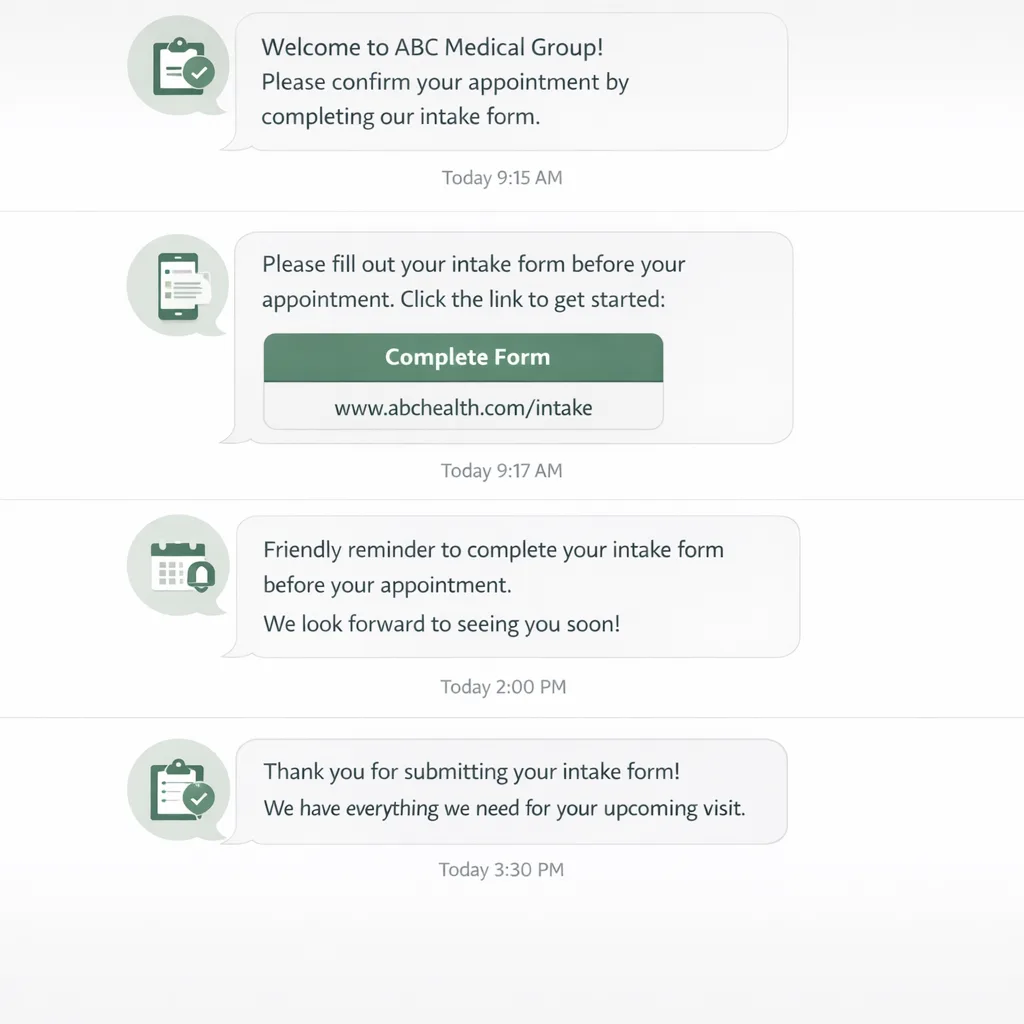
- Sending form links immediately after scheduling
- Reminding patients to complete forms and bring ID/insurance
FrontDesk’s Patient Outreach supports automated reminders and follow-ups so patients complete intake tasks without staff chasing them.
For practices comparing platforms, the breakdown in FrontDesk vs Luma Health can help clarify which workflows are better supported.
4) Build a “clean handoff” from intake to clinical team
Intake isn’t complete when the form is submitted—it’s complete when the right information is visible to the care team in time.
Best practices:
- Use a pre-visit checklist (insurance verified, consents signed, history complete).
- Route flagged items (e.g., suicidal ideation, high-risk symptoms) to clinical staff immediately.
- Create an exception queue for missing/invalid info.
In mental and behavioral health, intake often includes additional screening and consent complexity. See FrontDesk’s Mental Health Solutions for intake workflows designed for high-touch, high-sensitivity patient journeys.
5) Reduce no-shows with confirmation and expectation-setting
No-shows are frequently an intake problem: patients don’t understand timing, paperwork, or costs.
Tactics that work:
- Send immediate confirmation with date/time, address, parking, and telehealth instructions.
- Provide clear arrival guidance (e.g., “Arrive 15 minutes early if forms aren’t complete”).
- Include payment expectations (copay due at check-in, accepted payment methods).
- Offer easy reschedule options to keep the slot filled.
Primary care and urgent care have different levers here—urgent care needs faster triage and routing; primary care benefits from proactive pre-visit collection. Explore tailored approaches in Primary Care Solutions and Urgent Care Solutions.
What to collect during intake (and what to stop collecting)
A common reason intake drags: practices collect everything “just in case.” Instead, separate intake into three tiers.
Tier 1: Must-have before the appointment
- Full name, DOB, contact details
- Reason for visit / chief complaint
- Insurance member ID + payer (or self-pay selection)
- Consent to treat + privacy acknowledgment
- Medication/allergy list (or “none/unknown” with follow-up plan)
Tier 2: Helpful to have pre-visit (but can be completed later)
- Full health history questionnaires
- Social history and lifestyle screening
- Detailed family history
- Prior records requests
Tier 3: Often unnecessary (or better collected by clinician)
- Highly detailed narrative fields that patients don’t complete accurately
- Repeated demographic questions already in your EHR
- Long paper-style forms that aren’t optimized for mobile
Tip: If a question has a high “skip rate,” either make it conditional, move it later, or remove it.
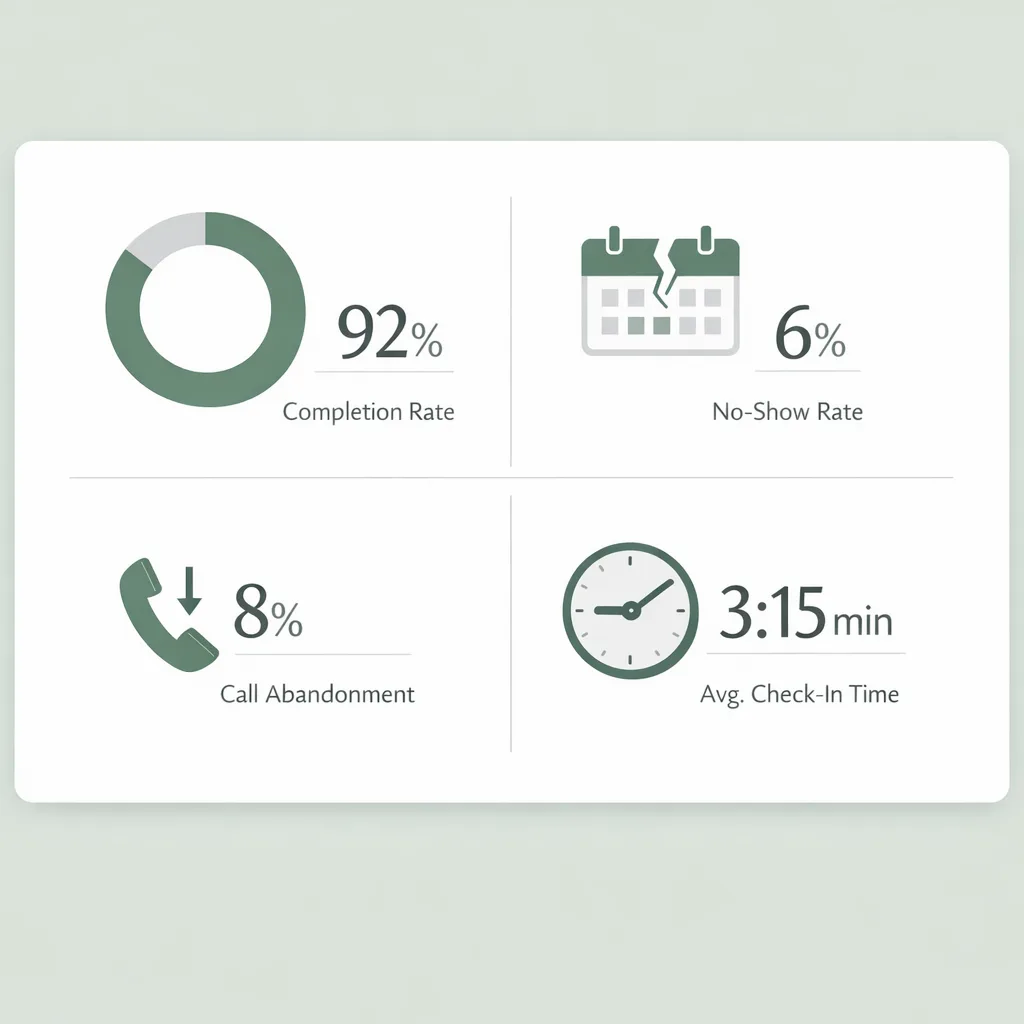
A KPI dashboard for intake: what to measure weekly
You can’t improve what you don’t measure. Start with a lightweight scorecard your office manager can review in 15 minutes.
| Metric | What it tells you | Healthy target (typical) | How to improve |
|---|---|---|---|
| Form completion rate (pre-visit) | Whether patients finish intake before arrival | 70–90% | Shorter forms, earlier send, reminders |
| Avg. time to schedule (phone or web) | Friction in access | < 5 minutes | Scripts, automation, fewer transfers |
| Call abandonment rate | Whether phones are overloaded | < 5–10% | AI receptionist, call routing, self-serve |
| Check-in time at front desk | Day-of bottlenecks | < 3–5 minutes | Pre-visit intake, clear instructions |
| Eligibility/insurance error rate | Downstream billing risk | Trending down monthly | Required fields, verification workflow |
| No-show rate (new patients) | Expectation gaps and weak confirmation | Varies by specialty | Confirmations, reminders, easy reschedule |
| Staff time spent on intake tasks | Capacity and burnout indicator | Trending down | Automation + standardization |
To connect intake improvements to growth, use the Practice Growth Calculator to estimate how increased kept appointments and faster access translate to revenue.
Patient experience: make intake feel effortless
Streamlining intake isn’t only about speed; it’s about confidence. Patients should feel guided, not processed.
Use plain language and micro-instructions
Replace “Complete the attached packet” with:
- “Please complete these 8 questions before your visit—takes about 3 minutes.”
- “Have your insurance card ready to snap a photo.”
- “If you get stuck, reply to this text or call us.”
Offer multiple channels (without duplicating work)
Patients vary—some prefer text, others email, others phone. The key is to keep the underlying workflow unified so staff aren’t re-entering data.
FrontDesk’s Patient CRM helps centralize conversations and patient context so your team can see what’s been collected, what’s missing, and what reminders have already been sent.
Close the loop after forms are submitted
A simple acknowledgment reduces anxiety and inbound calls:
- “You’re all set—forms received.”
- “Next step: arrive 10 minutes early and bring ID.”
- “Questions? Reply here.”
To measure whether your intake changes are improving perception, send a short post-visit survey using the Patient Satisfaction Survey.
Staff playbooks: scripts, roles, and exception handling
Even with great tools, intake fails when roles are unclear.
Define roles by outcome (not by habit)
Assign ownership for:
- Scheduling and appointment type selection
- Insurance capture and verification queue
- Form completion monitoring
- Day-of check-in exceptions
Create an exception playbook
Write down what to do when:
- Patient can’t complete digital forms
- Insurance is inactive or unclear
- Patient is late or arrives without ID
- High-risk symptoms are disclosed during intake
This reduces “decision fatigue” and keeps service consistent across staff.
Train to reduce call time without rushing patients
Use a short structure:
- Confirm reason for visit
- Offer the next best appointment
- Confirm contact method (text/email)
- Send intake link and set expectations
If your team wants a stronger conversion script for new patient calls, share the guide New Patient Calls That Convert.
Using analytics to continuously improve intake
Intake is a living system. Patient behavior changes, payers change, staff changes—so your workflow needs ongoing tuning.
FrontDesk’s Practice Analytics can help you spot patterns like:
- Which appointment types produce the most incomplete forms
- Peak call times that drive abandonment
- Reminder sequences that improve completion
- No-show trends by provider, day, or location
Tie intake to patient value (not just admin time)
Not all appointments have the same long-term impact. When intake improvements increase retention and follow-ups, the financial upside compounds.
Use the Patient Lifetime Value Calculator to estimate what a retained patient is worth over time—especially helpful when justifying investments in automation.
Real-world examples: what streamlined intake looks like
Practices often worry that changing intake will disrupt operations. Case studies show the opposite: when intake is simplified and automated, staff regain time and patients get faster access.
- In behavioral health, see how Clarity improved intake operations in the Clarity Mental Health Intake story.
- In primary care, learn how reduced call pressure and better routing improved responsiveness in FamilyFirst Primary Care Call Volume.
Use these as templates: identify one bottleneck (calls, forms, eligibility, reminders), fix it, then expand.
Implementation plan: a 30-day roadmap
If you’re not sure where to start, this phased approach avoids overwhelming staff.
Week 1: Baseline and quick wins
- Measure current KPIs (completion rate, no-show, call abandonment)
- Standardize appointment types and required fields
- Shorten your intake form to Tier 1 essentials
Week 2: Pre-visit digital intake
- Send intake links immediately after scheduling
- Add 1–2 reminders before the appointment
- Create an exception workflow for non-digital patients
Week 3: Phone and messaging optimization
- Update call scripts and triage rules
- Automate FAQs and status updates where possible
- Centralize conversations in a single patient timeline
Week 4: Review and refine
- Compare KPIs to baseline
- Identify top 3 drop-off points (e.g., insurance photos, signatures)
- Adjust form logic, reminders, and instructions
Frequently Asked Questions
What is the patient intake process?
The patient intake process includes the steps from first contact through check-in where a practice collects demographics, insurance, consent, and clinical history. A strong intake workflow ensures the care team has accurate information before the visit. It also reduces administrative rework and improves the patient experience.
How can small practices streamline intake without hiring more staff?
Start by standardizing appointment types, shortening forms to the essentials, and sending digital intake links immediately after scheduling. Add automated reminders so patients complete tasks without staff follow-up. Even basic automation can reduce call volume and front-desk congestion.
What should be included in a new patient intake form?
At minimum: patient demographics, contact preferences, reason for visit, insurance details, key medical history, medications/allergies, and required consents. Use conditional questions to avoid overwhelming patients. Keep it mobile-friendly and easy to complete in under 5 minutes when possible.
How do you reduce no-shows during intake?
Set expectations early with clear confirmations, arrival instructions, and policies. Use reminder sequences and make rescheduling easy so patients don’t simply miss the appointment. Tracking no-shows by appointment type helps you tailor messaging where it matters most.
Is digital intake secure and HIPAA-compliant?
Digital intake can be secure when vendors use appropriate safeguards like encryption, access controls, and auditability. Practices should also limit access to patient data and document policies for handling exceptions. Always confirm your tools and workflows align with HIPAA requirements and your organization’s compliance standards.
Conclusion: intake is your fastest path to better access and growth
Streamlining intake is one of the most practical upgrades in healthcare practice management: it reduces phone pressure, shortens check-in, improves data accuracy, and helps patients feel cared for before they ever meet the clinician. Start by mapping your workflow, standardizing what you collect, and using automation to handle repetitive steps.
If you’re ready to modernize the patient intake process without adding complexity, FrontDesk can help you automate outreach, centralize patient communication, and track performance—so your team spends less time on intake and more time on care.