The Ultimate Guide to Digital Forms: Streamlining Patient Intake and Documentation

Paperwork shouldn’t be the first “clinical experience” a patient has with your practice. Yet for many healthcare and service businesses, intake still means clipboards, illegible handwriting, missing signatures, and staff chasing down forms while phones ring. Digital forms change that equation—making patient intake faster, data more reliable, and healthcare documentation easier to retrieve, route, and act on.
This guide breaks down what digital forms are, where they create the most operational value, and how to implement them without disrupting your front desk. You’ll also find practical templates, examples, and a step-by-step rollout plan.
What are digital forms (and why they matter in healthcare)?
Digital forms are electronic versions of intake, consent, screening, and administrative documents that patients complete on a phone, tablet, or computer. Unlike “fillable PDFs,” modern digital forms can:
- Validate required fields (reducing missing data)
- Capture e-signatures with timestamps
- Trigger workflows (routing, notifications, reminders)
- Write data into systems of record (EHR, CRM, spreadsheets)
- Standardize questions across staff and locations
For practices, the biggest win is consistency: the same questions, asked the same way, collected the same way—every time.
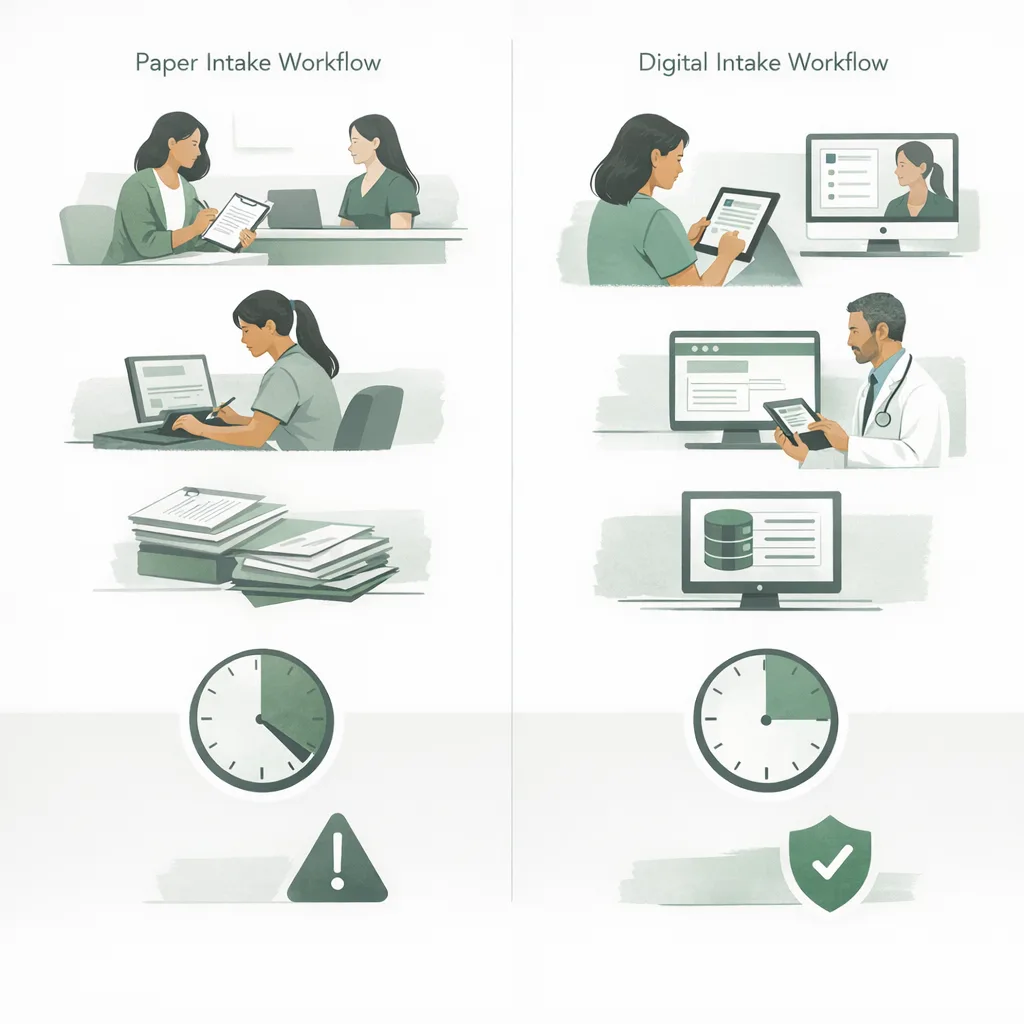
The hidden costs of paper intake
Paper forms feel cheap, but they’re expensive in labor and risk. Common costs include:
- Rework time: staff re-entering data into the EHR or practice management system
- Delays: appointments starting late because patients arrive early to complete forms
- Errors: typos, misread handwriting, incomplete histories
- Compliance exposure: misplaced documents, unsecured storage, unclear consent trails
- Patient friction: frustration before care even begins
Industry research consistently shows administrative burden is a major driver of burnout and inefficiency. For example, multiple studies and surveys report clinicians spend significant time on documentation and administrative tasks, and patient-facing teams often spend hours per day on intake-related follow-ups. Reducing intake friction is one of the fastest ways to improve throughput and satisfaction.
Where digital forms create the most impact
Not every document needs to be digitized on day one. Start where you’ll see measurable improvements quickly.
1) New patient intake
New patient intake is typically the highest-variance workflow: different staff ask different questions, patients forget details, and insurance data arrives incomplete.
A strong digital intake flow standardizes:
- Demographics and contact preferences
- Insurance details (including photos of cards)
- Chief complaint and symptom history
- Medical history, medications, allergies
- Consent and HIPAA acknowledgements
If you’re mapping this workflow now, the New Patient Intake use-case page is a helpful reference for what “good” looks like end-to-end.
2) Clinical and operational documentation
Digital forms aren’t only for first visits. They can streamline ongoing healthcare documentation, including:
- Visit-specific questionnaires (e.g., PHQ-9, GAD-7, pain scales)
- Treatment plan acknowledgements
- Telehealth consent
- Release of information (ROI)
- Financial policies and payment authorization
When documentation is standardized and time-stamped, audits become simpler and chart completeness improves.
3) Patient experience and retention
Intake is often the first impression. When patients can complete forms on their phone before arriving, practices commonly see:
- Shorter check-in lines
- Fewer “forgot my ID/insurance” moments (because you can request uploads)
- Better perceived organization and professionalism
After the visit, digital surveys and follow-ups help you detect issues early. Pair your forms strategy with a structured feedback loop using the Patient Satisfaction Survey tool or the Patient Satisfaction Survey template.
Digital forms vs paper vs fillable PDFs
A quick comparison helps teams align on why “PDF by email” isn’t the same as a true digital workflow.
| Capability | Paper forms | Fillable PDF | Modern digital forms |
|---|---|---|---|
| Required-field validation | ✗ | Limited | ✓ |
| Mobile-friendly experience | ✗ | Often poor | ✓ |
| E-signature with audit trail | ✗ | Varies | ✓ |
| Automated routing/notifications | ✗ | ✗ | ✓ |
| Structured data export/integration | ✗ | Limited | ✓ |
| Version control across locations | ✗ | Hard | ✓ |
| Accessibility (language, font, device) | Limited | Limited | Better |
If your current intake relies on PDFs, moving to true digital forms is often the difference between “paperless” and “actually faster.”
What to include in a high-performing patient intake form
Good intake forms balance completeness with completion rates. The goal isn’t to ask everything—it’s to ask what you need now, and collect the rest through follow-ups or visit-specific questionnaires.
Core sections (most practices)
Include these as a baseline:
- Patient identity: legal name, DOB, preferred name, pronouns (optional), address
- Contact and consent: phone/email, communication preferences, texting consent
- Insurance: payer, member ID, group number, relationship to subscriber, card images
- Reason for visit: chief complaint, goals, urgency, preferred appointment times
- Medical history: conditions, surgeries, medications, allergies
- Administrative policies: financial policy acknowledgement, cancellation policy
- Signatures: HIPAA, consent to treat, telehealth consent (if applicable)
To speed up your build, start from a proven structure like the Patient Intake Forms template.
Specialty add-ons (examples)
Depending on your practice type, add targeted questions:
- Mental health: PHQ-9/GAD-7, safety screening, preferred therapist attributes
- Physical therapy: pain scale, functional limitations, injury mechanism, prior imaging
- Dental: chief concern, sensitivity, recent procedures, medication list
- Med spa: contraindications, pregnancy/breastfeeding, photos consent
For mental health teams looking to reduce no-shows and improve conversions, align digital intake with your call process using Mental Health Intake Calls.
How to design digital forms patients actually complete
Completion rate is your north star. A form that captures “everything” but is abandoned halfway is worse than a shorter form that arrives complete.
Use progressive disclosure
Only show follow-up questions when relevant. Examples:
- If “Yes” to insurance → show insurance fields
- If “Yes” to medications → show medication list fields
- If “Telehealth” selected → show telehealth consent
Keep reading level simple and consistent
Write like you speak at the front desk:
- Replace “primary complaint” with “What brings you in today?”
- Replace “contraindications” with “Is there anything that would make this treatment unsafe for you?”
Optimize for mobile
Most patients will complete forms on a phone. Design with:
- Short labels
- Large tap targets
- Minimal scrolling per section
- Clear progress indicators
Reduce typing with smart inputs
Practical tactics:
- Dropdowns for common options (insurance payers, appointment preference)
- Address autocomplete
- Date pickers
- Photo upload for insurance cards and IDs
Build trust with microcopy
Patients share sensitive information. Add one-sentence reassurance near sensitive fields:
- “This information helps your clinician provide safe care.”
- “Your data is securely stored and only shared with your care team.”
Streamlining workflows with FrontDesk Digital Forms
Digital forms are most valuable when they connect to your front office workflows—reminders, follow-ups, routing, and documentation.
FrontDesk’s Digital Forms are designed to reduce back-and-forth and help teams capture complete, structured information before the visit.
Common workflows to automate
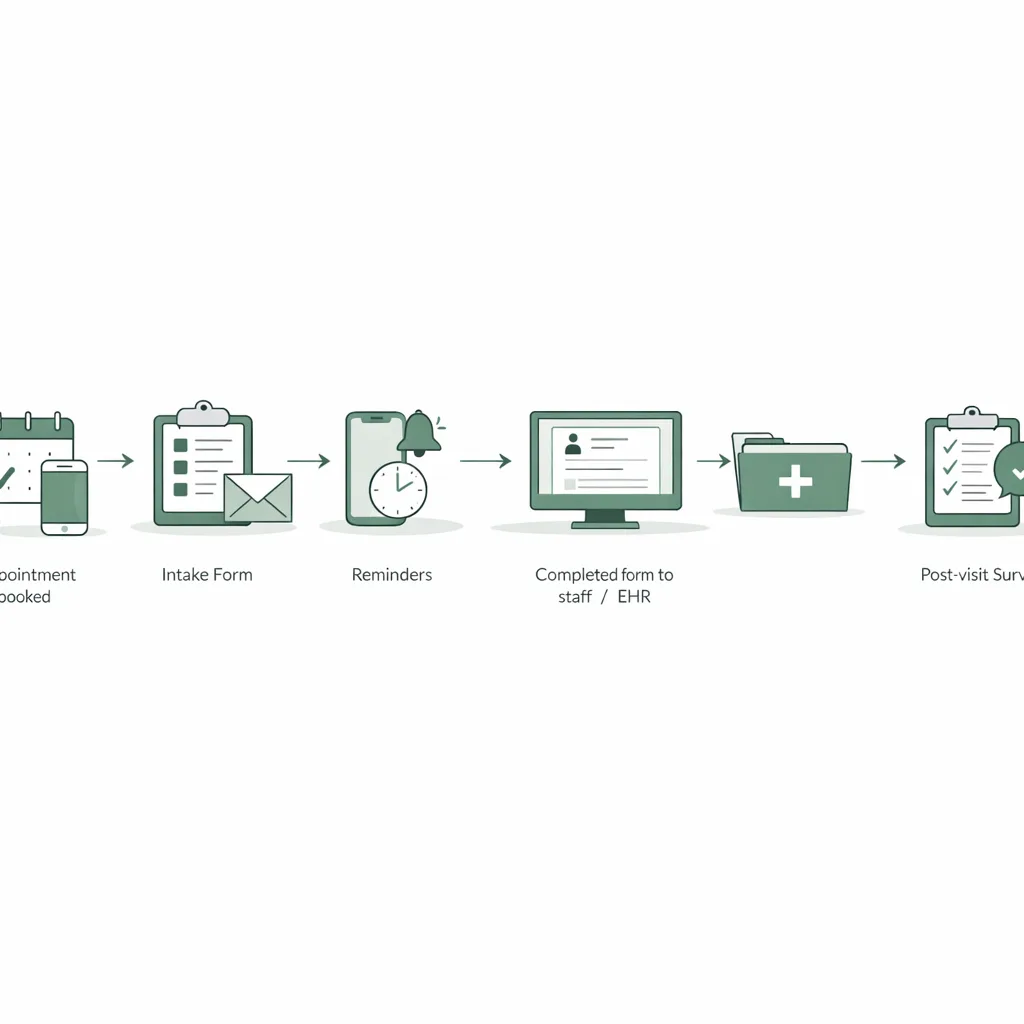
Here are high-impact automations many practices implement:
- Pre-visit intake: send forms immediately after booking or after an inbound call
- Incomplete form follow-up: automated reminders for patients who haven’t finished
- Conditional routing: notify staff when a patient flags urgent symptoms
- Post-visit documentation: send outcome measures or satisfaction surveys
To extend forms into ongoing engagement, pair them with Patient Outreach for reminders, reactivation, and follow-ups.
Connecting forms to your patient record
Digital intake becomes more powerful when it’s tied to a unified patient profile—so staff can see:
- Form completion status
- Contact preferences
- Prior submissions
- Outreach history
This is where a centralized system like Patient CRM supports continuity across calls, texts, forms, and follow-ups.
A step-by-step implementation plan (without disrupting operations)
A successful rollout is less about technology and more about change management. Use this phased approach.
Step 1: Audit your current intake and documentation
Collect:
- All paper forms, PDFs, and “front desk scripts”
- The top 10 reasons forms come back incomplete
- Where data gets re-entered (and by whom)
Then define your goals. Examples:
- Reduce check-in time by 5 minutes per patient
- Cut missing insurance fields by 50%
- Increase pre-visit completion rate to 80%+
Step 2: Start with one high-value form
Pick the form that creates the most friction today—often new patient intake.
If you need a fast starting point, use the Intake Form Generator to draft a baseline and customize from there.
Step 3: Decide when and how you’ll send forms
Common delivery moments:
- Immediately after scheduling
- 48–72 hours before the appointment
- Upon arrival via QR code (backup option)
Best practice: use at least two touches (send + reminder), and make it easy to ask for help.
To strengthen your scheduling and conversion process alongside intake, align your call handling with New Patient Calls That Convert and the New Patient Call Script.
Step 4: Build a “completion rescue” process
Even great forms won’t hit 100% completion. Create a simple protocol:
- If incomplete 24 hours before visit → send reminder
- If incomplete 2 hours before visit → front desk calls/texts
- If still incomplete at arrival → use a tablet or quick triage version
Step 5: Train staff with role-based expectations
Give each role a clear checklist:
- Front desk: how to resend links, verify completion, handle common questions
- Clinical staff: where to find submissions, what to do with red flags
- Billing: how to verify insurance fields and card images
Step 6: Measure, refine, and expand
Track performance weekly for the first month:
- Pre-visit completion rate
- Average check-in time
- Missing-field rate (insurance, DOB, consent signature)
- No-show rate (especially for new patients)
Then expand to:
- Consent packets
- Specialty questionnaires
- Post-visit surveys
Compliance, privacy, and risk considerations
Digital forms touch regulated data, so build with security and auditability in mind.
Key safeguards to look for
- Role-based access controls (who can view what)
- Secure storage and transmission
- Audit trails for signatures and edits
- Retention policies aligned with your state and specialty requirements
Minimize data you don’t need
A simple rule: if you don’t use it, don’t collect it. Unnecessary fields increase abandonment and expand risk.
Make consent explicit
Use clear consent language and ensure patients can access copies of what they sign.
Real-world example: improving mental health intake
Mental health practices often face high inquiry volume and complex intake requirements (clinical screening + insurance + scheduling preferences). A streamlined digital intake flow can reduce manual back-and-forth and help route patients to the right level of care faster.
For a concrete example of how a practice improved intake operations, see the Clarity Mental Health Intake case study.
Calculating ROI: how digital forms pay for themselves
ROI typically comes from time savings, fewer errors, and improved patient conversion/retention.
Cost and benefit areas to quantify
- Staff time spent on data entry per new patient
- Appointment delays (minutes per visit)
- Claim issues due to incomplete insurance info
- No-shows and last-minute cancellations
- Lost leads from slow follow-up
To estimate the downstream value of smoother intake and better retention, use the Patient Lifetime Value Calculator. Even modest improvements in retention or conversion can outweigh software costs.
Quick ROI worksheet (example)
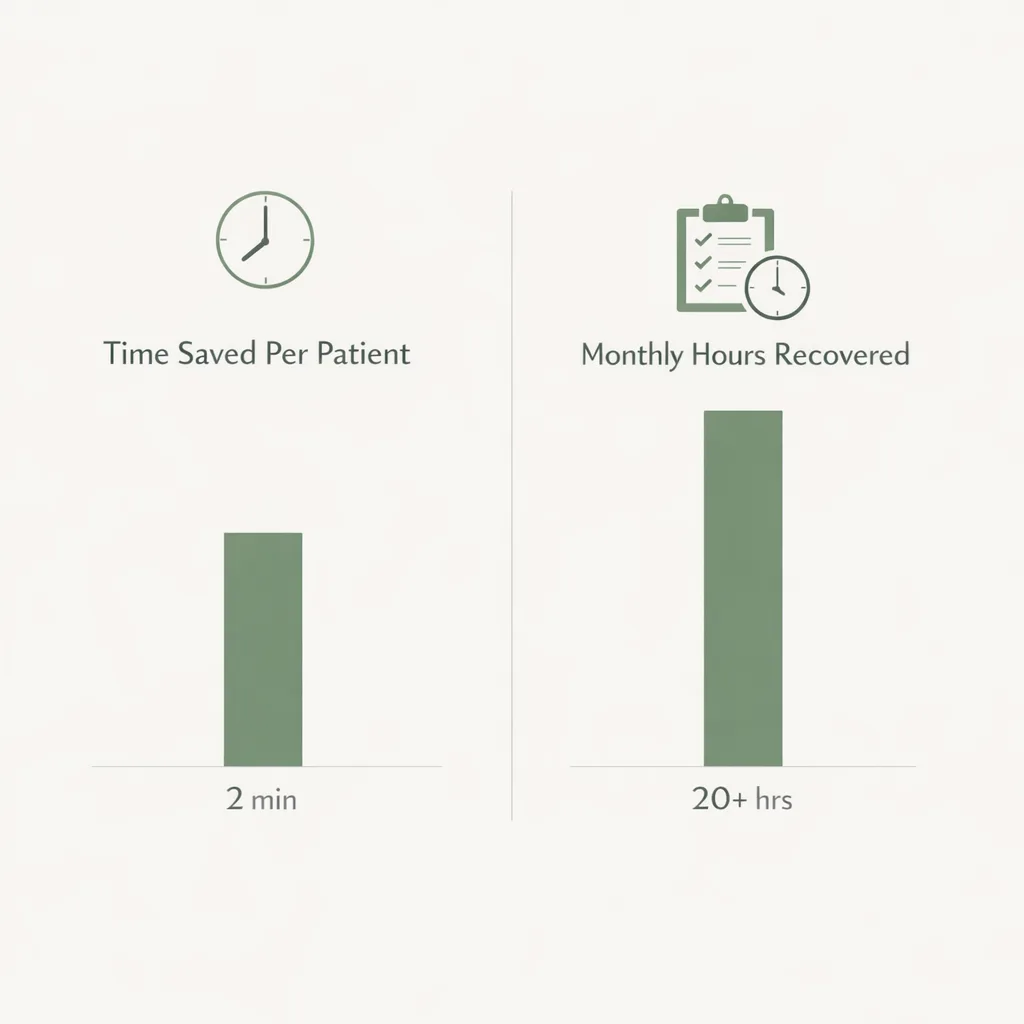
Use this simple math:
- Minutes saved per new patient (data entry + chasing missing info)
- × New patients per month
- ÷ 60 = hours saved per month
- × loaded hourly rate = monthly labor value
Then add avoided costs (claim rework, rescheduled visits) and revenue impact (more completed bookings).
Best practices checklist for digital forms success
Use this checklist to pressure-test your setup:
- Form can be completed on mobile in under 8–10 minutes (for baseline intake)
- Required fields are enforced for critical items (DOB, insurance ID, consent)
- Patients can upload insurance card images
- You have an incomplete-form reminder process
- Staff know where to find submissions and what to do with red flags
- Post-visit feedback loop is in place (survey + follow-up)
- You review metrics monthly and iterate
If you’re also modernizing communication, the blog Leveraging AI for Effective Patient Communication: Best Practices for Growth pairs well with a digital forms strategy.
Frequently Asked Questions
Are digital forms HIPAA compliant?
Digital forms can be HIPAA compliant when the platform uses appropriate safeguards like secure transmission, access controls, and audit trails. Compliance also depends on how your practice configures access and trains staff. Always confirm your vendor’s security posture and ensure your internal processes match policy.
How do we get older or less tech-savvy patients to complete digital intake?
Offer multiple paths: send forms by text/email, provide a QR code at check-in, and keep a tablet available as a backup. Keep forms short, mobile-friendly, and written in plain language. Staff should be able to resend links quickly and answer common questions.
Should we replace every paper form at once?
No—start with the highest-impact workflow (usually new patient intake) and expand after you hit stable completion rates. A phased rollout reduces disruption and makes training easier. Once the team trusts the process, adding consents and post-visit surveys is straightforward.
What’s the difference between digital forms and an intake form PDF?
PDFs often create friction on mobile, have limited validation, and usually don’t connect to automated workflows. Modern digital forms can require critical fields, trigger reminders, route submissions, and store structured data. The result is fewer incomplete intakes and less manual re-entry.
How can digital forms reduce no-shows?
Pre-visit forms increase commitment and help staff identify barriers earlier (insurance issues, scheduling constraints, uncertainty about services). Automated reminders and easy rescheduling options also reduce last-minute drop-offs. When intake feels organized, patients are more likely to follow through.
Conclusion: make intake faster, cleaner, and more patient-friendly
Digital forms are one of the simplest upgrades you can make to improve patient intake and healthcare documentation at the same time. When forms are mobile-friendly, validated, and connected to your workflows, staff spend less time chasing paperwork—and patients spend more time receiving care.
If you’re ready to modernize your intake process, explore FrontDesk Digital Forms and build a streamlined workflow that fits your practice—without adding more work to your front desk.